#428F2AK3QH 0:18
Table · 12
0/3 served- 1× Margherita
- 1× Aperol Spritz
- 1× Tiramisù

Order from the table. Pay from the phone.
Time is your guests’ most valuable resource. With a single scan, they browse in their own language, instantly AI-translated, then order and pay from their phone — at their own pace, without waiting on busy staff. Your team sees every order the moment it lands. Built for cafés, bars, restaurants, and hotels.
Personal onboarding · We set you up · Flat monthly price
Based on data from restaurants using qorder
The shift is already happening
78% of customers prefer to place orders through self-serve kiosks or online.
Square, Future of Commerce 2024
Descriptions, translations, your storefront blurb — the slow part of going digital. qorder drafts them in seconds; you review and save.
Write your menu once. AI translates it into eight European languages, so every guest orders in their own.
Blank on what to write? AI drafts an appetising description from the dish name. You tweak it and save.
AI writes a warm one-line intro for your storefront from your name — the first thing guests read. Tweak it and save.
Every scan, order and tip turns into a clear picture of what is working — and what to do more of. One dashboard, no spreadsheets.
Revenue, orders, average ticket and tips — each compared to the period before, so you know in one look whether this week beat last.
Your best sellers ranked by units and revenue, and the slow movers holding your menu back — so you promote the winners and cut the dead weight.
Order patterns by hour and by day of the week, so you roster staff and prep stock for when it actually gets busy.
A scan-to-order funnel with your most-scanned tables and how often guests take an upsell — so you see where the sale slips away and fix it.
Q is a friendly helper built right into qorder. Ask how anything works — in plain words — and get a clear answer that takes you straight to the right screen.
How do I mark a dish as sold out?
Open Tickets, tap the dish, then “Sold out”. It hides from the menu instantly — flip it back anytime.
Day or night, mid-service, no waiting on support — Q knows every qorder feature and answers on the spot.
Ask in English or Bulgarian and Q replies the same way — the whole team can use it, whoever is on shift.
A new hire learns qorder by asking, not by reading a manual — so a fresh face is taking orders the same day.
From scan to paid order, in three steps.
A QR code at the table opens your menu in their own language. No app, no account — nothing between them and the order.
Choose items, add a note, tip if they wish, and pay in one touch — Apple Pay, Google Pay, Revolut, or card. Unhurried, from cart to confirmation.
The paid order appears instantly on your board, with table, items, and notes. Move it from accepted to served, one calm tap at a time.
orderTranslate your menu once. The customer-facing page detects the diner’s browser language and renders in any of eight European languages: English, Bulgarian, German, French, Spanish, Italian, Russian, or Romanian.
Bring your own Stripe or Borica merchant account. Diners pay from their phone with whatever method suits them. Money settles directly to you — qorder never holds your funds.
Kitchen and bar staff see every new ticket the moment the customer pays. One tap moves an order through accepted → preparing → ready → served. No printer, no chits.
Every paid order arrives the instant a guest pays — table, items, and notes, all in order. Move it through the shift one tap at a time. No printer, no paper tickets, no chaos — just a clear, calm flow your team can trust.
Table · 12
0/3 servedTable · 7
1/3 servedTable · 3
1/2 servedDesktop in the office, tablet on the pass, phone on the go — qorder is built for all of them. Check orders, tweak the menu, or see today's takings wherever you are.
Same product. Tuned to how your shift actually runs.
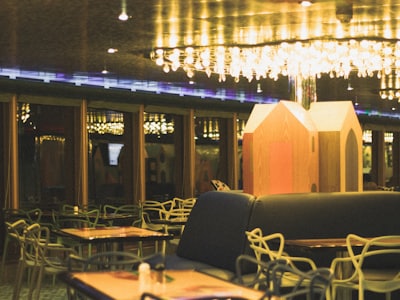
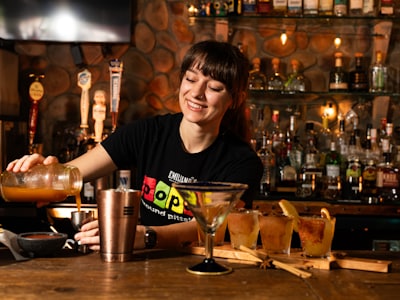
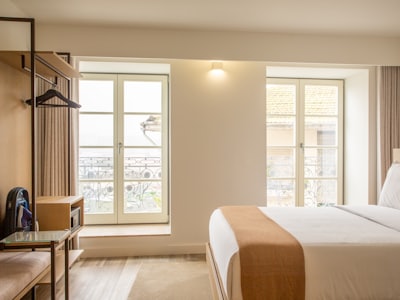
The same moments on a busy shift — before qorder, and after.
| Without qorder | With qorder | |
|---|---|---|
| Ordering | Guests flag down a waiter. Wait. Repeat the order. Hope it’s right. | Guests order from their phone the moment they’re ready. Calm and in control. |
| Language | One menu, one language. Visitors struggle. | The menu opens in each guest’s own language — eight, AI-translated on Pro. |
| Payment | The bill comes. A second trip with the card reader. | One touch from the guest’s phone — Apple Pay, Google Pay, Revolut, card. |
| Kitchen | Handwritten tickets, or a printer that jams. Orders get lost. | An organised, live board the moment the guest pays. One tap per stage. |
| Receipt | Paper slip. Lost by the time the guest reaches the car. | Bookmarkable URL. Proof of order without an account. |
One flat monthly price per location, billed directly by us. No commission on your sales, no per-order fees, no surprises.
A beautiful multilingual menu — no ordering
Free
No card, no trial — it just stays free
Small bar, café or brunch spot
€49 /month
Full-service restaurants, hotels, multi-venue
€99 /month
Stripe
Cards, Apple Pay, Google Pay, Revolut Pay — international card mix.
Borica
Direct bank-card processing on Bulgaria's national card scheme.
Borica works with most Bulgarian banks, including:
UniCredit Bulbank · DSK Bank · UBB · Postbank · Fibank · Allianz Bank · Central Cooperative Bank · ProCredit Bank · Investbank · TBI Bank · D Commerce Bank · BACB
Customers pay from their phone with cards, Apple Pay, Google Pay, or Revolut Pay — through your own connected Stripe or Borica account. Money lands directly in your bank on your provider’s normal settlement schedule. qorder never touches your customers’ money. We bill you separately for the flat monthly subscription.
You can accept payments via Stripe or Borica. Stripe covers international cards plus Apple Pay, Google Pay and Revolut Pay. Borica is the Bulgarian national card scheme and works with most BG banks (UniCredit Bulbank, DSK, UBB, Postbank, Fibank and others). You bring your own merchant account and keep your standard processing rate. qorder never takes a cut of your sales — you pay one flat monthly price, billed directly by us.
Yes. Showcase is our menu-only plan and it costs nothing — no card, no trial period, no expiry date. You get the multilingual QR menu, AI menu translation, Chef's picks and meal deals, and your menu insights. What it does not include is ordering and payments: guests read the menu on their phone but can't order from it. If you want that later you move up to Starter, and nothing you've built has to be redone — the same menu simply starts taking orders.
No. We set up your account and walk you through building your menu in the browser, then print the QR stickers we generate for you. Customers don’t install anything either — the menu is just a web page that opens when they scan.
The customer-facing menu auto-detects the browser language. Starter supports English and Bulgarian. Pro unlocks the full set of eight: English, Bulgarian, German, French, Spanish, Italian, Russian, and Romanian. You don’t have to write them all yourself — on Pro, AI drafts each translation (and can write your item descriptions too), and you just review and save. Allergens and other system labels are translated for you.
You cancel orders from inside qorder via the ticket board. Refunds go through your payment provider's dashboard — the money sits in your merchant account, not ours, so we can't refund on your behalf. We deep-link to the relevant refund page from the cancelled order in your history.
Get in touch from this page and we'll learn about your venue and set you up. We provision your account, help you build your menu, and you can place a test order using your payment provider's test mode before going live. One flat monthly price, billed directly — no card on file, no long-term contract.
GDPR-ready
Minimal PII, by design
PCI-DSS payments
Via Stripe + Borica — card data never touches our servers
EU-hosted
Frankfurt region, your data stays in the EU
Tell us about your venue and we’ll set you up. One flat monthly price, billed directly — no commission, no card on file.